• BORED Logo

  • iPOD and SDHC – SDXC cards

26th December 2012

iPOD and SDHC – SDXC cards

By Tarkan | Permanent Link
Updated Mon, 20th May 2013

IntroductionSD Adapter Installed

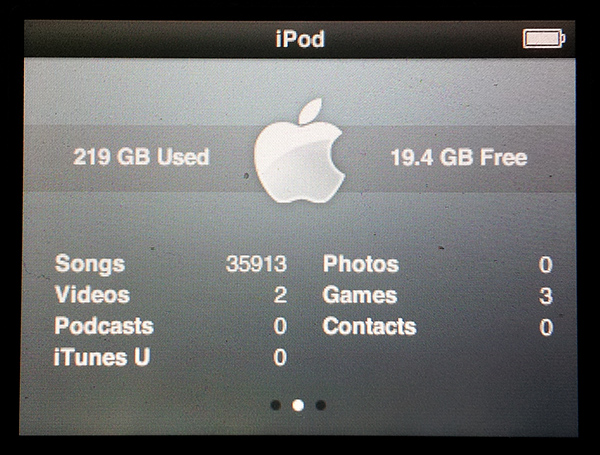
For some time many people have wanted to use my iFlash iPod CF adapter with the new generation of large format SD memory cards. SDHC and SDXC are the new generation of SD cards which are cheaper and have capacities of upto 256Gb and growing.
For many years you could buy SD-CF adapters but they would not work in the iPOD. Most of these convertors required a high working power supply current that the iPod was unable to provide, while others just did not provide the correct True IDE functions.

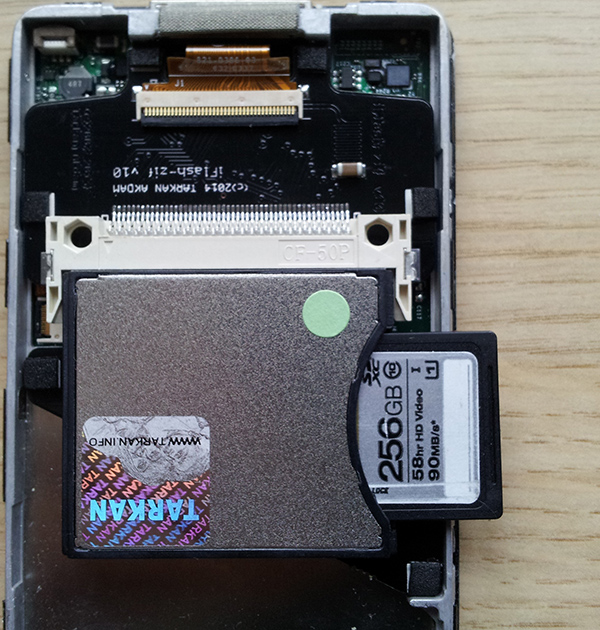
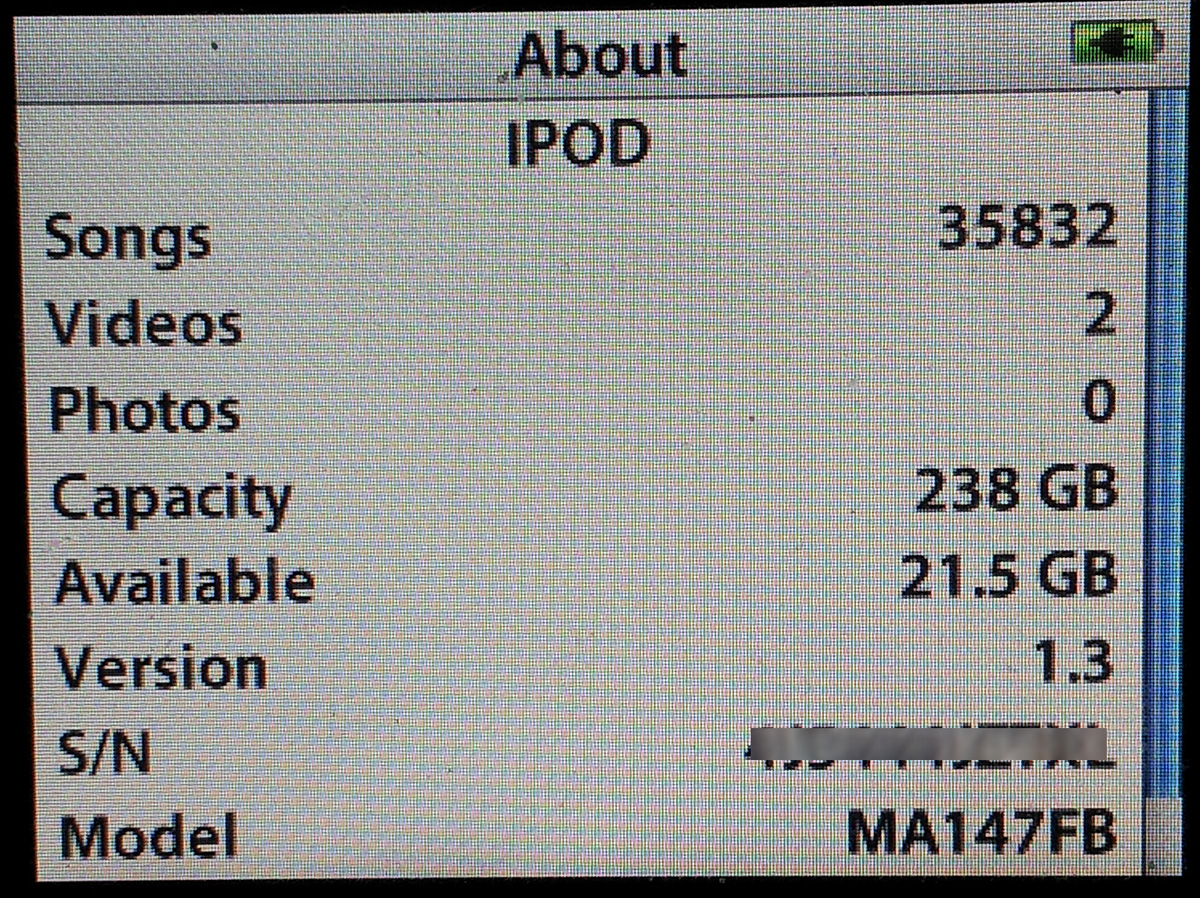
The Good NewsWorking in a 6g iPOD

Recently a user let me know he had succeeded in getting a 64Gb SDXC card working in my iFlash with an SD to CF adapter.
So after some investigation and spending a small fortune on various SD – CF adaptors I noted that there is a new generation of pcb design used in these adapters which seems to work well with the iFlash and the iPOD. Even better it works in all the iPod generations supported by my iFlash – 5g, 5.5g, 6g, 6.5g, and 7g.

Installation

Installation is simple, the iFlash is first installed – then install the SD card in to your SD-CF Adapter – finally insert the whole thing in to the iFlash, ready to restore the iPod.Working in a 5g iPOD

SDHC and SDXC which cards to get

So far all the SDHC and SDXC cards I tested worked ok, so it is looking likely that majority of the SD cards out there will work ok.

In terms of card speed, one user has reported issues playing FLACS with a Class 4 card. I would suggest you want a minimum of a Class 6 card with Class 10 the prefered option.

So far… working and tested in 5g / 6g / 7g iPods (Updated: 20th May 2013)
8Gb SDHC Class 10 Centon
16Gb SDHC Class 10 CnMemory
16Gb micro SD Class 4 Sandisk (possible too slow for FLAC playback)
64Gb SDXC Class 10 7DayShop
64Gb SDXC Class 10 Busbi (one of the cheapest card available)
64Gb SDXC Class 10 Centon
64Gb SDXC Class 10 Lexar
64Gb microSDXC UHS-I Sandisk Ultra
64Gb SDXC Class 10 Sandisk
64Gb SDXC Class 10 Transcend
128Gb SDXC Class10 Kingston
128Gb SDXC Class10/UHS-I 400x Lexar
128Gb SDXC Class10 Patriot Memory LX Series
128Gb SDXC Class 10 Sandisk
128Gb SDXC Class 10 Transcend Ultimate
256Gb SDXC Class10/UHS-I 400x Lexar
256Gb SDXC Class10/UHS-I 600x Lexar

Cards with possible compatibility issues
64GB PNY Polaroid SDXC Class10/UHS-I (6g)

Which SD-CF Adapter

You can purchase the required SD adapter on my store page, as well as a discounted iFlash SD Adapter bundle.

All the SD-CF adapters I checked - the new generation had a different pcb design, which is possible to see through the SD socket. I have a gallery of photo’s below to show you. (clicking on the images enlarges them).

Update: I have bought a few more SD-CF Adapters, and so far all the ones that offer Eye-Fi Compatiblity are the newer versions which work ok.

enjoy…….

SD-CF AdapterOlder PCB Version - not workingnew version pcb - working ok


Posted on Wed, 26th December 2012 at 2:02 am under Modding, Tutorials. You can follow any responses to this entry through the RSS 2.0 feed. You can leave a response, or trackback from your own site.

There are currently 92 responses to “iPOD and SDHC – SDXC cards”

Comments? Suggestions? Help? Well here's your chance! Leave a comment.

  1. 1 On December 31st, 2012, Tim said:

    So the general idea here is that by using the CF adapter and an adequate CF -> SDXC/SDHC/SD adapter, the iPod can be made to run off of SD cards now? Does this still leave room in, say, a 5th generation iPod to fit capacitors from an iMod inside the case?

  2. 2 On December 31st, 2012, Tarkan said:

    Yes, it does not change the space available inside the iPod – so the iMod can still be done as before.

  3. 3 On January 1st, 2013, Jordan H. said:

    Hey there, I love your website and the projects you have listed! Truely awesome, man. I have a few questions, maybe we could skype or somethin if you had a few minutes time? But really, just wondering whether what you have here is SDHC to CF I or to CF II. Id think it makes a big difference since it is going into a small enclosure such as an ipod. Do you recommend me trying this over using a zif socket adapter thing with some expensive or cheap but small capacity CF? Will a extreme CF or SD for that matter with whatever is the correct adapter (im seeing many different PCB and don’t really want to start taking THOSE apart cause I’m somewhat poor these days :) ) draw more battery life than a spinnin hard drive? Blah blah, these and other similar questions. Any help is greatly appreciated, if you have a chat or IRC or skype or something and would want to trade some ideas, that be great too. THANKS!!!
    :)

  4. 4 On January 3rd, 2013, Tom said:

    Does anyone know if this CF adapter will work? The pic doesn’t show the PCB very clearly.

    http://www.amazon.com/SDHC-Compact-Flash-Reader-Adapter/dp/B0052GZNY0/ref=pd_sim_e_9

  5. 5 On January 3rd, 2013, Tarkan said:

    Someone reported buying this one :-
    http://www.newegg.com/Product/Product.aspx?Item=9SIA1AZ0F11447
    Which looks the same as pictured on the Amazon site. However the problem with these suppliers and why I have not posted any links is that sometimes the product you get is not exactly as pictured, so it can be hit and miss.

  6. 6 On January 4th, 2013, Tom said:

    I actually looked at that same card at the Newegg link last night. So that Newegg and Amazon card works (assuming it’s the one pictured)?

  7. 7 On January 4th, 2013, Tom said:

    nevermind. i just saw the rating on Newegg. that person said the CF in the Newegg (and Amazon) link worked with a Centon 64GB class 10 SDXC and an iPod Video 30GB

  8. 8 On January 8th, 2013, Tom said:

    the 64GB SDXC card is only rated at 10MB/s read/write. is that fast enough for FLAC files?

  9. 9 On January 8th, 2013, Tarkan said:

    Yes that is plenty fast for Flac’s. A 16bit 44Khz stereo wave file is about 1.5Mbps and a flac is a non-loss compressed version of that, so will always be

    I think the Class 4 type cards would be slow for Flac as the outright transfer speed on them is about 1 to 2MB/s, which is very close to the maximum bitrates of Flac files. I measured about 8MB/s transfer speed on the Class 10 cards which is ok and I suspect Class 6 cards will be ok as well.

  10. 10 On January 8th, 2013, Tom said:

    thanks, that’s good to know.

    looks like the Busbi brand is only sold in the UK. i found this 64GB class 10 SDXC card from Komputerbay on amazon’s US site for $38.99 USD shipped (a bit cheaper than the Busbi, at least for us Americans). not sure if anyone’s tried it, but the brand makes CF cards that work with the iflash.

  11. 11 On January 8th, 2013, Tom said:

    oops, forgot the link:

    http://www.amazon.com/Secure-Digital-Ultimate-Extreme-Computer/dp/B0064DEI50/ref=sr_1_40?s=electronics&ie=UTF8&qid=1357644935&sr=1-40&keywords=64GB+Class+10+SDXC+Flash+Memory+Card

  12. 12 On January 8th, 2013, Tarkan said:

    I think with the SD to CF thing, I predict that all SDHC and SDXC cards will work, as the SD-CF Adapter is actually doing the communication with the iPod, so the brand or type of SD card makes no difference.

  13. 13 On January 12th, 2013, Chris said:

    Hi, out of curiosity would you happen to know if any CF adapters would work with the recently released Lexar 256GB SDXC cards as well as your CF iPod adapter?

    Thanks for your time

  14. 14 On January 12th, 2013, Tarkan said:

    Maybe, it is a bit expensive to buy at the moment. I do hope to get a 128Gb in soon to test out.

  15. 15 On January 13th, 2013, Tarkan said:

    Ok people I have updated the article again.

    Looks like any SD-CF Adapter offering compatability with Eye-Fi cards will work with the iFlash and iPods.

  16. 16 On January 13th, 2013, John S. said:

    I would also like to know if anyone has successfully gotten a 128GB SD card to work with an SD-CF adapter and the iFlash. I’m looking at $140 for a 128GB off-brand CF card (“Komputerbay”? Hmmmm…), or about the same price for a Sandisk/Lexar high-end SD card including the SD-CF adapter.

    Is there a performance bottleneck due to using the SD-CF adapter, or can the adapter push data as fast as the SD card can handle?

  17. 17 On January 14th, 2013, Paul L. said:

    “Ok people I have updated the article again. Looks like any SD-CF Adapter offering compatability with Eye-Fi cards will work with the iFlash and iPods.”

    Tarkan, unfortunately this is not true. I have an Mk II version of the iFlash and have now tried two (thinking the first one might be bad) of the new “4th gen” SD/XC to CF adapters along with numerous different capacity SDHC/XC cards (32gb+)with no success. I need at minimum a 128gb (preferably 256gb) so I turned in this direction after seeing the SD card update info on your site and after endlessly trying to find a 256GB CF (apparently,they do not exist).

    BTW, iFlash is awesome. All CF cards I’ve used work perfectly (currently using a 128GB 800x Lexar but dissapointingly have had to streamline my content to fit).

    Keep up the good work and help us find a 256gb solution !!

  18. 18 On January 14th, 2013, Tom said:

    @Paul i also bought the exact “4th Gen” SD-CF adapter pictured on this page and could not get any of my SD cards to work with it (8GB & 32GB microSDHC Class 4 SanDisk & 64GB SDXC Class 10 Team). but once i inserted a 16GB 600X CF card, i was able to restore the ipod w/o any problems.

  19. 19 On January 14th, 2013, Tarkan said:

    Paul, Tom – were did you purchase the SD-CF Adapter.

    I have ordered a total of 3 from various sources, I only ordered ones which specified Eye-Fi compatability – regardless of the product photo I got a 4th Gen Extreme SD-CF in a blister pack.

    They all work fine in 5g and 6g iPods I have here, and many people have reported the same to me as well. I think need to look in to this to try and work out what is going on.

  20. 20 On January 14th, 2013, Tarkan said:

    @John S – I do not have any of the high performance SD cards yet to tryout – but I know from my photography interest these SD-CF adapters tend to limit performance of the underlying SD card slightly. I am getting a 128Gb in the next week or so for testing and will update this article then.

  21. 21 On January 14th, 2013, Tom said:

    @Tarkan, I bought mine off ebay. here’s the link to an exact one the same seller is selling:

    http://goo.gl/gER9F

  22. 22 On January 14th, 2013, Paul L. said:

    @ Tarkan, bought mine off eBay as well albeit from a different seller (same card though).

  23. 23 On January 16th, 2013, Phil Shen said:

    Hey Guys, we are the original manufacturer of that CF adapter. On the market you will find a CF adpter call “4th Generation” and another called “3rd Generation”, both marked with SDXC logo; actually they are exactly the same product with different retail package. If you have any question or any issue about that CF Adapter, please visit the Facebook fan club at http://www.facebook.com/SDCF4I5 ; or just google the keyword “SDCF4I5″, thank you.

  24. 24 On January 16th, 2013, Tom said:

    i found a Facebook fan page for these “Extreme SD-CF Adapters.” apparently, there’s really no “4th Gen” adapters. a distributor simply decided to change the packaging of some 3rd Gen adapters to make them “4th Gen.” anyway, i posted about about my experience with the adapter linked them to this blog. they asked me for a picture of the adapter with the PCB showing. the 4-digit number printed near the opening is the lot number. i got a reply saying that it may be because the working adapters are from a later lot (possibly 3rd or 4th) and that my non-working adapter is from the 1st or 2nd lot. i’m not sure which lot number correspond to which order, but I sent them a reply asking about it.

    they also offered to send me another adapter to test. i’ll update when i receive the new adapter. i also bought a 5G iPod. i’m going to test my adapter with the 5G to see if maybe it works in that. i’ll update later this week.

    https://www.facebook.com/SDCF4I5

  25. 25 On January 21st, 2013, Tarkan said:

    Quick update.
    A succesful report on a 7g iPod Classic with a 256Gb 400x UHS-I SDXC card. For the person who really needs their music with them…… :)

  26. 26 On January 26th, 2013, Corona said:

    hi there, thank you for this howto. I upgraded my iPod-mini with an 64GB SD-Card and a CF-Adapter. And it works perfectly.

    I used this adapter: http://www.delock.de/produkte/F_277_Adapter_61796/merkmale.html?setLanguage=en
    and a cheap SD-Card from QUMOX.

  27. 27 On January 29th, 2013, Eldan said:

    I had my iPod/CF/SDXC conversion working with a different adapter (“PA-CF18Z”, available on Amazon.com) but the assembly was too thick and the case wouldn’t close completely. So I ordered your adapter, which looks far superior. However, I can’t get the iPod to restore. I was surprised that I’d even have to restore, since it was already formatted and working.

    I reformatted the 64 GB Transcend SDXC card directly connected to the PC using fat32format.exe, and reinserted it into the “3rd Generation” CF Adapter. iTunes detects the iPod and seems to restore it, but when it reconnects it’s still in restore mode. Any advice?

  28. 28 On January 29th, 2013, Eldan said:

    I figured it out. I had to reformat the card with the -c1 flag in fat32format.exe. It’s working again!

  29. 29 On January 29th, 2013, Tarkan said:

    Them cheaper adapters are not designed for the iPod hence why you had to re-do the restore – the iFlash is designed to force UDMA connection and them adapters due to their design only setup DMA or PIO mode.

    The cheapo’s also put so much strain on the ribbon connection, they don’t last very long.

    Glad everything is working ok for you.

  30. 30 On February 4th, 2013, Matt said:

    I’m giving this one from Amazon a try. I will report back.

    http://www.amazon.com/gp/product/B000YZGCIU/ref=oh_details_o00_s00_i01

  31. 31 On February 4th, 2013, Tarkan said:

    Matt, That will not work – that is the older versions.

    I am getting stock of the sd-cf adapters in stock today – my price will be slightly cheaper than all the suppliers on Amazon, Ebay, etc, etc. So wait till I have them posted on my store page.

  32. 32 On February 4th, 2013, Matt said:

    Thanks for the heads up. I’ve put in a cancellation attempt with Amazon. Oddly enough, they sell that one in a combo deal with an Eye-Fi card and it is listed as Eye-Fi compatible. Hope to see yours soon. Tough to beat 15 bucks with no shipping charge.

  33. 33 On February 4th, 2013, Matt said:

    I suppose another problem is that I’m in the US not the UK. Would be difficult to match Amazon on that. Wish I could find a model that I felt secure in buying.

  34. 34 On February 4th, 2013, Tarkan said:

    Actually the correct 4th Gen cards cheapest is $19 on Amazon.

  35. 35 On February 4th, 2013, Matt said:

    A note about the one Adorama sells through Amazon: If you notice they have two pictures on that listing. Apparently they sell two different devices under the same SKU number. I called them and talked to their purchasing guy. Right now, they are selling the one pictured with the green check on this thread. I will report in when I get it.

    http://www.amazon.com/Flashpoint-Secure-Digital-CompactFlash-Adapter/dp/B0029Q9I1U/ref=dp_return_1?ie=UTF8&n=541966&s=pc

  36. 36 On February 5th, 2013, Tom said:

    i received the SD-CF adapter the manufacturer promised to send today. i’m happy to say that it works with both my 5th and 6th Gen iPods. i was able to restore in iTunes with a 64GB SDXC Class 10/UHS-I Team flash card.

    curiously, the new adapter has the same “1229″ printed on the PCB that the one i bought does. still don’t know why the one i bought didn’t work. oh well … i’m just glad i have a functional iPod again.

  37. 37 On February 5th, 2013, Phil Shen said:

    Hi Matt, the adapter with green label is the first generation CF adapter, much more earlier than the latest product. That’s the same one with PHOTOFAST CR-7100, like this ****LINK Removed Possible Phishing Site** ; I’m not sure it can use SDXC or not.

  38. 38 On February 7th, 2013, Vitaly said:

    Hi, how have changed battery life with SD-CF Adapter.

  39. 39 On February 8th, 2013, Tom said:

    anyone able to install rockbox on their 6.5th Gen iPod w/ the iFlash? i got as far as being able to load the UBI file onto the iPod, but couldn’t move past that stage – kept getting errors (rockbox wouldn’t load).

    used the instructions here: http://www.head-fi.org/t/532426/ipod-classic-rockbox-its-happening

  40. 40 On February 8th, 2013, Tom said:

    just wanted to add that i’m getting the error below:

    http://i284.photobucket.com/albums/ll40/1lazysheep/SSD/IMG_20130208_011720_zps7d5dc8c1.jpg

    i read the post in 2008 about rockbox and iflash. i’m using a class 10/UHS-I card so speed shouldn’t be the issue.

    i get this error after loading the UBI file (r867 from here: http://builds.freemyipod.org/). when i try to boot rockbox to install the “rockbox-ipodclassic.zip” file i get this error.

  41. 41 On February 8th, 2013, Stefan said:

    Hi – I am looking forward for you posting the sd-cf adapters on your store page.
    The harddrive of my Ipod Classic 80 GB crashed a few weeks before :(

    Greedings from Germany

    Stefan

  42. 42 On February 8th, 2013, Tarkan said:

    @Stefan – They are in stock and tested – will update my store page in the next day or so.

    @Tom – Only error report on Rockbox I got was due to the rockbox.ipod file missing on a SDXC card, but do not know anymore as I never got any follow ups on it.

  43. 43 On February 8th, 2013, Tom said:

    @Tarkan the error you’re getting is normal. the one i’m getting isn’t. guess i’ll go ask for help in that forum. thanks

    my ordeal continues … :)

  44. 44 On February 8th, 2013, Tom said:

    for those in the US that need an SDXC card. tiger direct currently has a sale on a Kingston SDX10V/64GB SDXC Card – Class 10 for $38 + SH

    http://www.tigerdirect.com/applications/searchtools/item-Details.asp?EdpNo=3924623&sku=K24-0214&SRCCODE=LINKSHARE&cm_mmc_o=-ddCjC1bELltzywCjC-d2CjCdwwp&AffiliateID=lw9MynSeamY-R0zcELbW5Cpce2HMmNM2xw

  45. 45 On February 9th, 2013, Rico said:

    Since the CF adapter is eye-fi compatible, i’m curious if someone already tried an eyefi card in their ipod?

  46. 46 On February 11th, 2013, Pete said:

    Hi! I purchased the adapter mentioned in post #5 and it works well with a Micro Center brand 32GB sdhc card. Any word of issues with the Kingston 128GB sdxc? Tiger Direct has it for $85 it’s under $100 at many other outlets. The Kingston card would be a cheap high capacity solution! Thanks again for your work!

  47. 47 On February 11th, 2013, Pete said:

    I should add that I have a 6th gen Ipod Classic.

  48. 48 On February 11th, 2013, Tarkan said:

    I would expect it to work ok, 256Gb works ok and all the 64Gb cards.

  49. 49 On February 11th, 2013, Matt said:

    The Lexar Professional 400X SDXC 128GB works with the adapter shown in an old 5.5 gen ipod with a 64mb logic board. Looks like the part number for the SD card is LSD128CTBNA400 Rev A.

  50. 50 On February 14th, 2013, Tarkan said:

    My Store page has been updated now, so the SD-CF Adapter and iFlash bundle can be ordered from me directly.

  51. 51 On February 15th, 2013, Mike said:

    Thank you for offering a package deal. Order has been placed

  52. 52 On February 20th, 2013, Stu said:

    Hi, just a quick thanks – after having two 7G 160GB hard disks fail in the last 6 months, i purchased one of your adapters a couple of weeks ago and now i can happily report that it’s working great combined with one of those CFSD adapters and a 128GB kingston SD card which i got off amazon for 73 quid.

    I was a bit concerned as whilst opening the case i accidentally snapped the little square chip off the headphone jack board, but it still works?!

    Anyway, many thanks. Hoping to add rockbox next!

  53. 53 On February 21st, 2013, Stu said:

    re: Rockbox – i am getting the same error as Tom mentioned on Feb 8th – “ATA: Error 80000000 while reading BBT (sector 0, count 1)
    This error appears when trying to run rockbox and also flashes up during installation of emcore (r866), although that subsequently boots ok.
    Looks like i’m stuck with stock firmware for the moment

  54. 54 On February 25th, 2013, Bob said:

    Wanted to mention that the Patriot Memory LX Series 128GB SDXC Class 10 Memory Card works.
    Using the 4th gen pictured SD to CF adapter. Installed in iPod 5.5 Gen Video with Rockbox.
    http://www.ncix.com/products/?sku=78753&vpn=PSF128GSDXC10&manufacture=Patriot&promoid=1302

  55. 55 On February 25th, 2013, Tarkan said:

    I have added it to the list, thanks for the feedback.

  56. 56 On February 26th, 2013, Mehmet said:

    Hi,

    I can confirm that, it works with Samsung 8GB Class 2 MicroSDHC (with SDHC adapter) and plays FLAC or ALAC without any issue. Transfer rates of the card; 9.5 MB/s reading and 4.5 MB/s writing.

    So, that’s just for an experiment about MicroSD compatibilty. Now I’ll go for an UHS-1 grade high speed MicroSD.

    And Tarkan;

    Very good man, very good seller. Thanks for all.

    Greets,
    Mehmet

  57. 57 On February 28th, 2013, Tarkan said:

    Hi Mehmet,

    Thanks for the feedback, glad it is all working for you.

  58. 58 On March 14th, 2013, Albert said:

    Hi Tarkan,

    Just wanna confirm that 64 GB SanDisk Ultra® microSDXC™ UHS-I work with your IFlash on Ipod Video 5.5 with Rockbox :)

  59. 59 On March 15th, 2013, Michael said:

    Hi Tarkan, finally received the sd-cf converter from you and thank you for the nice gift :) .

    I’ve tried using Sandisk Micro SD 2gb, 8gb class 2. Sandisk Micro SD 32gb class 4. Toshiba Sd 512MB on my Ipod 5g, ipod mini(stock firmware and Iriver H320 rockboxed with no issues.

    Will try Sandisk 64gb and 128gb micro SD class 10 tonight.

    thanks again

  60. 60 On March 15th, 2013, Tarkan said:

    Thanks for the feedback, glad it is working well for everyone.

  61. 61 On March 18th, 2013, Michael said:

    I just tried 64gb and 128gb Sandisk class 10 sd card. Working perfectly fine

  62. 62 On March 19th, 2013, Bob said:

    confirming Kingston 128GB SDXC Class 10 working (rockbox and original firmware)

  63. 63 On March 19th, 2013, Tarkan said:

    Thanks guys, the list is growing nicely. :)

  64. 64 On March 22nd, 2013, MKUltra said:

    Install everything into a 30GB Ipod 5.5 slim without changing the back panel. I had to take the adapter apart and shave it down to 5-6mm thickness. Works great with Lexar 128 GB class 10 Card.
    It is funny that Rockbox is much slower then Itunes when I copy files on it. It seem Itunes is actually faster with the SD card in comparison to the original HDD when copying files.

  65. 65 On March 22nd, 2013, Tarkan said:

    Thanks for the feedback, glad it is working ok.
    I am surprised you had to shave it to fit. My personal daily iPod is a thin back 5g and the fit is perfect.

  66. 66 On March 23rd, 2013, MKUltra said:

    Yes it would not fit. The original hard drive inside was 5 mm thick and the cf adapter is 7 mm by itself (combined almost 8 mm). A regular CF card would have worked. I probably could have forced it shut but this way it has all the foam inside without bending anything.

    I still try to figure out why rockbox is so slow in coping files. Itunes is very fast.

    Check out what I did to my Ipod touch 5G http://www.youtube.com/watch?v=PaNC9FmJt2k

  67. 67 On March 26th, 2013, Zeke said:

    Yesterday, I installed an iFlash/SD-to-CF kit with a Samsung 64GB microSD Class 10/UHS-1 card (in a Samsung microSD-to-SD adapter). I was able to restore my 5th Gen iPod in iTunes without issue. MP3 audio playback has been flawless.

    Thanks, Tarkan.

  68. 68 On April 20th, 2013, Peter Mitchell said:

    Hi Tarkan

    I got me adapter yesterday. Had some trouble with the dismantle: the housing where that ribbon cable connects (the last one you take out to allow the two halves to separate fully, top left of your adaptor when looking down on it) fell out and I can’t see how it goes back in. In the meantime, I have fitted a Transcend SDXC 64GB card from Amazon. The ipod seems to be in a loop at the moment, cycling between the apple logo and a flashing band across the screen.

    iPod video 80gb

    A. How does that little housing go back in?
    B. Is the loop ominous in terms of comparability?

    I hope I can solve this, because I have another to do with my other iPod next

    Regards
    Peter
    Adelaide

  69. 69 On April 20th, 2013, Tarkan said:

    Hi Peter,

    Sorry to hear of your troubles. First the SD card you have should work, the Transcend have been reported by serveral people as working ok.

    The other part I am a little confused, so have emailed you directly.

  70. 70 On April 21st, 2013, MKUltra said:

    Ok … I have finally figured out what the problem with Rockbox was (Ipod 5.5 video with adapter and 128 GB SD).
    For some reason Rockbox doesn’t like USB 3.0 that’s all. Whereas the apple os doesn’t care. It is actually lightening fast if plugged into a USB 3.0.

    So if you install and use Rockbox make sure you use USB 2.0 and install the boot-loader last…and it works like a charm!

  71. 71 On April 22nd, 2013, Avi said:

    Hi, got the adapter and it works fine with Sandisk ultra 64gb class 10 sdxc. But I have no luck with Rockbox, it crashes every time while playing. Installed it twice but without any luck….

  72. 72 On April 23rd, 2013, Tarkan said:

    Strange Rockbox is working well on SD cards, maybe it is card specific – I do not have that particular card hopefully someone else can help.

  73. 73 On April 26th, 2013, angelomartinez77 said:

    cf to sd ……………… you can get cf to sd cards at fyrs electronics the store or online and other online websites that sell cf to sd they all work just fine i got a random one from amazon , i spend 14 dollars on a cf to sd card that i got from amazon $9.00 + shipping and handling i think it was 4 dollars or so. igot the 4th generation extreme cf adapter sd to type 2 cf … i have an ipod mini 2nd gen with cf to sd adapter with a sone 16 gb flash card and it works just fine rockbox the same thing works great havent had a problem with it and i just did this yesterday …. 16 gb ipod mini cf to sd new battery installed works great …..

  74. 74 On April 28th, 2013, Andy said:

    Transcend 128GB Ultimate SDXC Class10 (TS128GSDXC10E) worked without issue in my 5.5G iPod Video

  75. 75 On April 28th, 2013, Tarkan said:

    Thanks for feedback, added to the list

  76. 76 On May 2nd, 2013, Fraser said:

    Hi

    I bought the Iflash adapter some time ago to fix click of death on my Ipod. I was happy enough with it, but I didn’t want to pay the exorbitant price for high capacity CF cards at the time, so I was using it with an 8GB CF. I did try with an older type CF/SD with no success.

    Delighted to report Tarkan’s silver adapter works a treat, I am now up and running with 64Gb using a cheap(ish) Komputerbay card. My Ipod5G is now fully operational again.

    Many Thanks.

  77. 77 On May 4th, 2013, Michael said:

    Is the sd adapter thicker than a normal cf card?

  78. 78 On May 4th, 2013, Michael said:

    The reason I ask is because I have the cheapo cf to zif adapter from amazon and am worried that it may not fit with the silver sd adapter I bought from here. Please let me know if I need to buy the iflash adapter so that my time without an ipod is minimized. Thanx

  79. 79 On May 4th, 2013, Michael said:

    Nevermind, I’m just gonna go ahead and purchase the iflash. Anyone looking for a cheap fast 64gb sdxc here is a Patriot Memory EP Series that reads/writes at 50mb/s & 35mb/s for $43. That is about the price of the no name ones but you get a trusted brand! Here is the link:

    ****LINK REMOVED OFFER NOT AVAILABLE****

  80. 80 On May 5th, 2013, Tarkan said:

    Hi Michael,

    I am not sure if my SD-CF adapter will work in other adapters, I know that using them adapters with my SD-CF adapter will be too thick to fit in a slim iPod.

    iFlash and SD-CF adapter will fit perfectly in a slim iPod.

  81. 81 On May 5th, 2013, Michael said:

    Thanks for your response, I’ve already purchased both from and looking forward to receiving them. Do you know what the maximum read speed the sd-cf adapter can do? Thanks again, I have really learned a lot from your site and looking forward to benefiting from your products. If I were sell modded ipods on ebay do I have permission use your name and reference your site (assuming that I can successfully complete the audiophile mod)?

  82. 82 On May 6th, 2013, Mike from New York said:

    Hi Tarkan,
    I received the bundle in a very speedy 6 days transit time to NY, very fast indeed. I am using the iFlash and the CF-SD card adapter in two separate builds. The CF-SD card adapter is for an iPod mini Gen.2 and I did that build yesterday, all went very smoothly and I can report no issues using a Lexar Professional 400x 128gb UDMA7 SD card. I have another stock iPod mini on hand for sound comparison and it’s safe to say the moving parts HDD harms SQ, the Flash based unit is clearly quieter and more revealing of low level detail, it’s not difficult to hear or something you must listen hard for. I’ll commence the iPod Video Gen 5.5 modification project using the iFlash and a Lexar 128gb CF card in the next day or two. Thanks again!

  83. 83 On May 6th, 2013, Mike from New York said:

    One clarification on the card I used for the iPod mini above, it’s a Class 10 UHS-1 Lexar Professional 400x SDXC, the same as is already mentioned on your compatibility list. In looking again at the packaging the UDMA7 designation apparently only applies to the same version/series Lexar CF card, which I also have and will use in an iPod Video Gen 5.5 upgrade in the coming days. But I wanted to be clear on the direct compatibility of your silver CF/SD adapter and the above particular memory card as it relates to the iPod mini 2G model. This is also notable and interesting because most of the CF/SD adapters I’ve seen only claim compatibility with cards up to 64GB capacity. Those may be lazy and non-updated product descriptions, but I wasn’t going to risk that disappointment/hassle when your silver CF/SD unit has no such limitation. I did have to double stick tape a piece of thin insulating plastic film (LCD screen protector material) to the bottom side of the silver adapter to be sure it’s metallic body wouldn’t short against the mini’s logic board.

  84. 84 On May 7th, 2013, Michael said:

    Sorry guys, that deal on the 64gb patriot sdxc card is not in stock. Tarken can you please remove that post so others don’t make the mistake of ordering from them? And do you know the max read speed that the sd adapter will permit? thx

  85. 85 On May 7th, 2013, Tarkan said:

    Maximum speed is very close to whatever the underlying SD card can do, however the iPod ATA stack tops out at about 20 to 30Mb/s (one day I will try and measure it accurately)

  86. 86 On May 8th, 2013, Juan Antonio Leon Machado said:

    I have the iFlash with CF adaptor and a Kingston 64Gb UH-1 Sdxc card.

    I have not problem installing Rockbox.

    When using the USB connection with the Rockbox firmware, this cause a corruption of the partition table of the card.

    If you want copy music (flac, for example) for listening with RockBox you have to use the USB connection with the original iPod firmware.

    I don’t know if only occurs with my card or is a common problem.

    Bye

  87. 87 On May 11th, 2013, jim said:

    hi tarkan!
    wanted to ask you beforehand if the sd cards have to be re-formatted and if so, which format? thanks

  88. 88 On May 11th, 2013, Tarkan said:

    Generally no, the iTunes restore will deal with formatting and partitioning.

  89. 89 On May 13th, 2013, cmarti said:

    Hi Tarkan,

    I noticed that most of the online sellers for the SD to CF card adapter are changing the packaging picture and the new card has a blue label.

    See this as an example: http://www.ebay.com/itm/SD-SDHC-SDXC-to-CF-Type-II-Adapter-Card-Reader-Supports-SDHC-SXHC-SD-Eye-Fi-/150965927872?pt=US_Memory_Card_Readers_Adapters&hash=item2326453fc0

    Did the cards you sell also changed or they are still the pink ones?

  90. 90 On May 14th, 2013, Tarkan said:

    There are some fake adapters around and also different distributors order the adapters with different labelling and branding – hence there is no difference between blue, pink labels or 3rd gen or 4th gen, etc.

    My adapters come directly from the manufacturer and I get them with no branding or markings – they have the latest firmware and board revisions.

  91. 91 On May 16th, 2013, Oswell said:

    HI, Just wondering if you can hot swap the SD cards (with iPod off)? Was thinking of fabricating a slot in the case with a cover to swap cards out should the mood take me? Just a thought.

  92. 92 On May 16th, 2013, Tarkan said:

    Yes you can do that, but you have to restart the iPod – i.e. OK and Menu button press.

    Only thing you have to be careful about is the SD slot is very close the Headphone ribbon, you may have just enough space if you cut the slot accurately.

Leave a Reply

Spread the Word
slashdot
delicious
digg
technorati
reddit
magnolia
stumbleupon
yahoo
google
  • Ads